
Three steps. One source of truth.
How it works
1. We set it up
We customize CurrentView to match your brand and get you live.
2. You update
Make changes in seconds with our simple dashboard.
3. They see it
Customers see the latest updates instantly on your site or via QR.
- 1
We set it up — or you do, in about ten minutes
- Create your account, name your business, pick what you sell (gelato, beer, pastries, dishes…) and we seed sensible categories and labels.
- Add your first location with its time zone. Add items by hand or import a CSV.
- Upload a logo and pick your colours. Prefer white-glove? The one-time setup fee gets it installed, branded and configured by us.
- 2
You update from the counter
- Open the Items list on any phone. Each item has Live, Today, Featured and Sold out switches per location.
- Sold-out flags reset automatically every morning in your location’s time zone.
- Staff accounts only see the switches they need — and only for their location.
- 3
They see it — everywhere, within a second
- The board link opens on any phone from a QR sign. Put the same link on a TV or tablet in the shop.
- Paste a two-line embed on your website and the live board appears there too, in your brand.
- Everything updates live — no refresh, no “republish”, no calling the front desk.
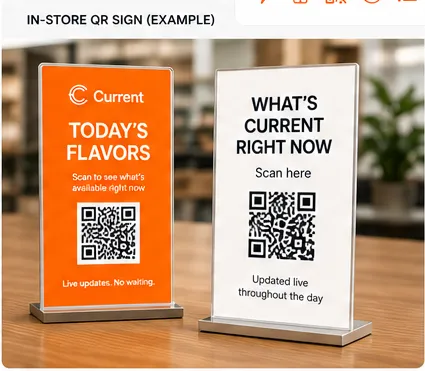
In-store QR signs, ready to print
Every location gets its own QR code. Download it, or print one of the included table-tent and A-frame designs — in your brand or ours.
Ready to know what’s current?
Set up your first board in minutes. No card needed to try it.